chargerhub.store
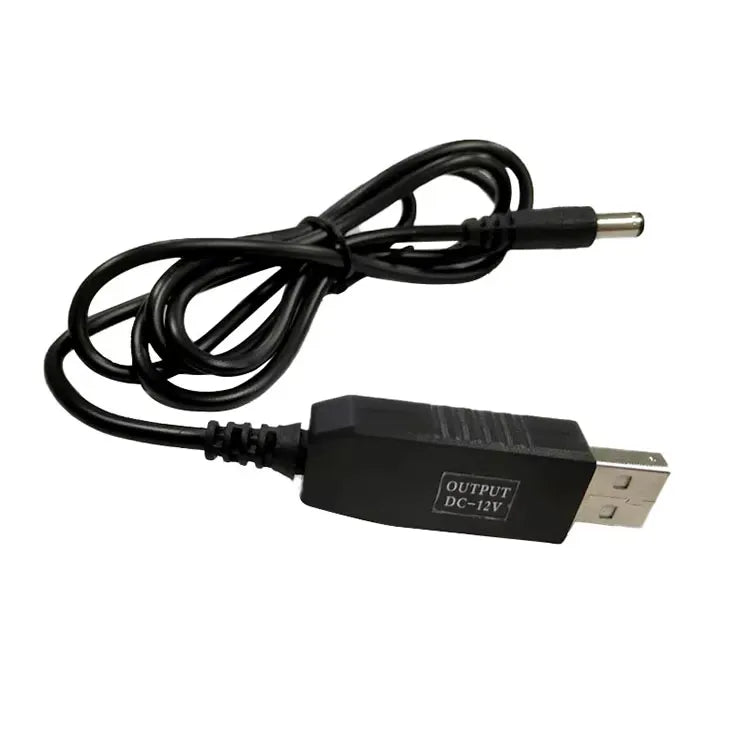
Power Bank to WiFi Router Cable – USB 5V to DC 12V
Power Bank to WiFi Router Cable – USB 5V to DC 12V
Couldn't load pickup availability
Turn Any 5V Power Bank Into an Instant UPS for Your WiFi Router
No need to buy an expensive mini-UPS to keep your internet alive during electricity cuts. The Power Bank to WiFi Router Step-Up Cable (USB 5V to DC 12V) lets you run your home WiFi router or fiber optic modem (ONT/ONU) directly from any standard mobile power bank.
Built with an upgraded internal boost chip inside the USB connector and 100% pure copper wire, this cable safely steps up your power bank's 5V USB output into a steady, regulated 12V DC output—giving you hours of uninterrupted WiFi for remote work, online classes, and gaming.
Estimated Power Bank Backup Time Chart
How long will your power bank run a standard 12V WiFi router?
| Power Bank Capacity | Estimated WiFi Router Backup Time |
| 10,000mAh Power Bank | 4 – 6 Hours of continuous WiFi |
| 20,000mAh Power Bank | 9 – 12 Hours of continuous WiFi |
| 30,000mAh+ Power Bank | 14 – 18+ Hours of continuous WiFi |
(Note: Actual backup time depends on whether you are running a basic single-band router or a dual-band fiber ONT modem.)
Key Features & Benefits
- Plug & Play Power Bank Backup: Simply plug the USB end into your power bank and the round DC pin into your router—no settings or configuration needed.
- Smart 5V to 12V Boost IC Chip: Built-in intelligent voltage booster prevents voltage drops, overheating, and router restarts while running on battery power.
- Universal 5.5 × 2.1mm ("Moti Pin") Connector: Fits almost all 12V routers and fiber devices, including TP-Link, Tenda, Huawei, ZTE, PTCL, StormFiber, Nayatel, Transworld, Jazz, and Zong home routers.
- Pure Copper Conductors: High-purity copper core ensures maximum power efficiency so your power bank battery drains slower and delivers a stable 12V / 0.8A current.
- Multi-Purpose 12V Power: Also works with power banks to run 12V CCTV cameras, 12V LED strips, mini DC fans, and audio speakers.
Technical Specifications
| Specification | Details |
| Power Source (Input) |
Any 5V USB Power Bank (5V/2A port recommended) |
| Device Output |
Regulated DC 12V (up to 0.8A) |
| Input Plug |
Standard USB-A Male |
| Output Plug |
DC 5.5mm × 2.1mm Barrel Jack (DC5521 / Standard Router Pin) |
| Internal Chipset |
Upgraded Intelligent DC-DC Step-Up Boost PCB |
| Wire Core & Jacket |
Pure Copper Conductor with Durable Black PVC Jacket |
| Cable Length |
Approx. 1 Meter (3.3 ft) |
How to Use With Your Power Bank
-
Check Your Router Label: Flip your router over and confirm the power input says 12V (e.g.,
12V === 0.5A,12V === 0.8A, or12V === 1A). - Unplug Wall Adapter: Remove the normal wall charger pin from the back of your router.
- Connect the Cable: Plug the round DC barrel jack into your router and insert the USB-A end into your Power Bank's 5V/2A output port.
- Stay Connected: Your router will boot up within seconds and run smoothly off your power bank.
Frequently Asked Questions (FAQ)
Q: Can I use this with any normal mobile power bank?
Yes! Any standard 5V power bank (10,000mAh, 20,000mAh, etc.) with a regular USB-A output port will power your 12V router through this cable.
Q: Will it work on Fiber Optic (GPON / ONT) routers like Huawei or ZTE?
Yes, most fiber ONT routers operate on 12V DC and use the standard 5.5mm round pin. As long as your router pulls 0.8A–1A or less, it will run reliably on your power bank.
Q: Is it safe to leave connected to my power bank for several hours?
Yes. The upgraded internal boost PCB regulates the voltage at a steady 12V DC and includes thermal and over-voltage protection to keep both your power bank and router safe.
Store Merchandising Tip: In Shopify, set up a "Frequently Bought Together" or "Bundle & Save" widget on this cable's product page linking directly to your 10,000mAh and 20,000mAh Power Banks so customers buying a cable for load shedding can add a dedicated router power bank to their cart in one click.